by Vitaly, Wednesday, November 11th, 2015
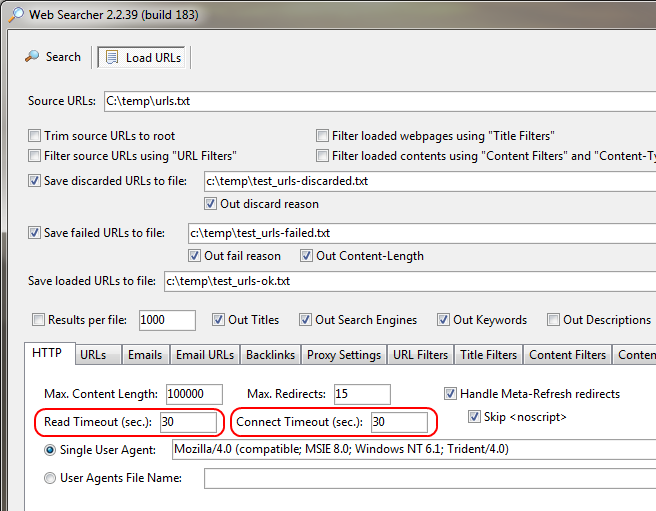
Web Searcher 2.2.39 has been released.
“Read Timeout” and “Connect Timeout” options added.
by Vitaly, Wednesday, November 11th, 2015
Web Searcher 2.2.39 has been released.
“Read Timeout” and “Connect Timeout” options added.
by Vitaly, Friday, July 31st, 2015
When TCP Port Mapper (tcpportmap) acts as a proxy (ProxyMode has one of the values: HTTP, CONNECT, SOCKS4 or SOCKS5), then MapToHost and MapToPort can be used to forward all traffic to the specifed host:port.
For example, let ProxyMode=CONNECT and TCP Port Mapper has received this command from the client:
CONNECT www.google.com:80 HTTP/1.1
MapToHost=127.0.0.1, MapToPort=8080 then TCP Port Mapper will establish connection to 127.0.0.1:8080.MapToHost=127.0.0.1, MapToPort is not specified (or zero) then TCP Port Mapper will establish connection to 127.0.0.1:80.MapToHost is not specified (or empty), MapToPort=8080 then TCP Port Mapper will establish connection to www.google.com:8080.MapToHost and MapToPort are not specified then TCP Port Mapper will establish connection to www.google.com:80.by Vitaly, Thursday, July 30th, 2015
IMAP Checker 1.1 has been released.
This tool allows to count e-mails in the Inbox and Spam folders.
It uses IMAP protocol to access mailboxes and it has multi-threaded architecture.
On the IMAP Servers tab you need to fill in the IMAP settings for different e-mail domains.
Domain(s): aol.com, aol.co.uk
Host: imap.aol.com
Port: 143
SSL/TLS: No SSL Support
Authentication Type: User/Password
Inbox Folder: INBOX
Spam Folder: SPAM
Domain(s): gmail.com, googlemail.com
Host: imap.gmail.com
Port: 993
SSL/TLS: Implicit SSL
Authentication Type: User/Password
Inbox Folder: Inbox
Spam Folder: [Gmail]/Spam
Domain(s): hotmail.com, outlook.com
Host: imap-mail.outlook.com
Port: 993
SSL/TLS: Implicit SSL
Authentication Type: User/Password
Inbox Folder: Inbox
Spam Folder: Junk
Domain(s): yahoo.com, yahoo.co.uk
Host: imap.mail.yahoo.com
Port: 993
SSL/TLS: Implicit SSL
Authentication Type: User/Password
Inbox Folder: Inbox
Spam Folder: Bulk Mail
Tags: IMAP
by Vitaly, Friday, June 26th, 2015
TCP Port Mapper 1.70 released.
Now IPv6 addresses can be used in all settings: ListenIP, MapToHost, MapArray, MapFromFile, MapFromUrl etc.
It is preferred to enter IPv6 addresses, enclosed in square brackets. That allows to extract the Port from the IPv6:Port.
Example of the IPv6 address: [2001:4860:4860::8888].
If the ListenIP setting is not specified (or ListenIP=ANY) you can set SrvIPv6=Yes.
That allows to force listening incoming IPv6 connections.
If the both IPv4 and IPv6 addresses are exist for the destination host, TCP Port Mapper will use IPv4 address. To force using IPv6 address you can set: CntIPv6=Yes.
by Vitaly, Wednesday, July 1st, 2015
URL to resolve IPv4 address:
http://ipv4.test-ipv6.com/ip/?callback=_jqjsp&asn=1&testdomain=test-ipv6.com&testname=test_asn4
Response (IPv4):
_jqjsp({"ip":"xxx.xxx.xxx.xxx","type":"ipv4","subtype":"","via":"","asn":"yyyyy","asn_name":"Provider Name,US","asnlist":"yyyyy","padding":""})
Extract IPv4 regular expression:
\d{1,3}\.\d{1,3}\.\d{1,3}\.\d{1,3}
URL to resolve IPv6 address:
http://ipv6.test-ipv6.com/ip/?callback=_jqjsp&asn=1&testdomain=test-ipv6.com&testname=test_asn6
Response (IPv6):
_jqjsp({"ip":"xxxx:x:xxxx:xxx:xxxx:xxxx:xxxx:xxxx","type":"ipv6","subtype":"Teredo","via":"","padding":""})
Extract IPv6 regular expression:
([0-9a-fA-F]{1,4}:){7,7}[0-9a-fA-F]{1,4}|([0-9a-fA-F]{1,4}:){1,7}:|([0-9a-fA-F]{1,4}:){1,6}:[0-9a-fA-F]{1,4}|([0-9a-fA-F]{1,4}:){1,5}(:[0-9a-fA-F]{1,4}){1,2}|([0-9a-fA-F]{1,4}:){1,4}(:[0-9a-fA-F]{1,4}){1,3}|([0-9a-fA-F]{1,4}:){1,3}(:[0-9a-fA-F]{1,4}){1,4}|([0-9a-fA-F]{1,4}:){1,2}(:[0-9a-fA-F]{1,4}){1,5}|[0-9a-fA-F]{1,4}:((:[0-9a-fA-F]{1,4}){1,6})|:((:[0-9a-fA-F]{1,4}){1,7}|:)
Tags: External IP, IPv4, IPv6, Proxy
by Vitaly, Friday, June 12th, 2015
DNS Server 1.49 has been released.
Added the ability to send requests to the IPv6 DNS servers. Now DNSHost, DNSHost2 and FromIP settings can contain IPv6 addresses (read Help for more info).
Example (using Google IPv6 DNS):
DNSHost=2001:4860:4860::8888
DNSHost2=2001:4860:4860::8844Added the ability to listen incoming DNS requests on IPv6. SrvIP and SrvIP2 settings can contain IPv6 addresses.
If SrvIP is not specified or it contains Any value then you can force using IPv6 by specifying:
SrvIPv6=Yesby Vitaly, Tuesday, May 19th, 2015
Account Verifier 1.31 has been released.
In new version:
by Vitaly, Monday, April 27th, 2015
“User-Agent” HTTP header allows to identify Internet Explorer version.
Look the following article to learn more about Internet Explorer user-agent strings: Understanding user-agent strings.
Pay attention to the compatibility changes in IE 11:
Below is the list of some user-agent strings used by Internet Explorer 8-11:
IE 8:
IE 9:
IE 10:
IE 11:
Tags: HTTP, IE, User Agent
by Vitaly, Tuesday, March 31st, 2015
You can read old blog posts at http://blog.optinsoft.net/